
The demo is always the easy part.
You prompt Claude Code, it builds something that looks polished. You show it to someone and they're impressed. Then you try to build a second page. Or you come back to the project the next day. And slowly — sometimes all at once — the brand starts slipping. Different fonts. Made-up spacing. Components that don't match what you built last week.
That's not a Claude Code problem. That's an architecture problem. And there's a straightforward fix. (We later documented what training an AI agent across 29 real pages taught us — the context problem generalizes well beyond websites.)
The Real Issue: Claude Code Has No Memory
Every session starts completely blank. It doesn't know what fonts you chose yesterday, which components are approved, what copy voice you've been building, or what mistakes it made on the last build — unless you tell it. Every. Single. Time.
Most people respond to this by prompting harder. Better system prompts, longer instructions, more context pasted into the chat. It helps — but it doesn't scale. And it breaks the moment someone else opens the project.
The better response is to stop relying on prompts and start building a system.
That system is what we call the Context Stack.
"The Context Stack is a seven-file system that gives Claude Code persistent memory across build sessions — so every page stays on-brand without re-prompting from scratch."
What the Context Stack Is
The Context Stack is a set of seven files that live directly in your project repository. Claude Code reads them before every build session. Together, they give it everything it needs to remember: design tokens, component rules, copy voice, approved patterns, and a living log of mistakes it's already made.
The result: output that stays consistent across sessions, across pages, and across people. Once the files are in place, you're not fighting the tool — you're directing it.
This isn't a plugin. It's a file structure and a process. Seven markdown documents and one CSS file. The sophistication is in what goes inside them and how Claude Code is instructed to use them.
The Seven Files
File 1: CLAUDE.md — The Briefing
This is the only file Claude Code reads automatically at the start of every session. It's the briefing that happens at the top of every meeting. Keep it under 40 lines. Its job: tell Claude Code what project it's working on, which other files to load, and what's already been built.
Think of it as the session handoff document. It answers: Where are we? What are the rules? What's still open?
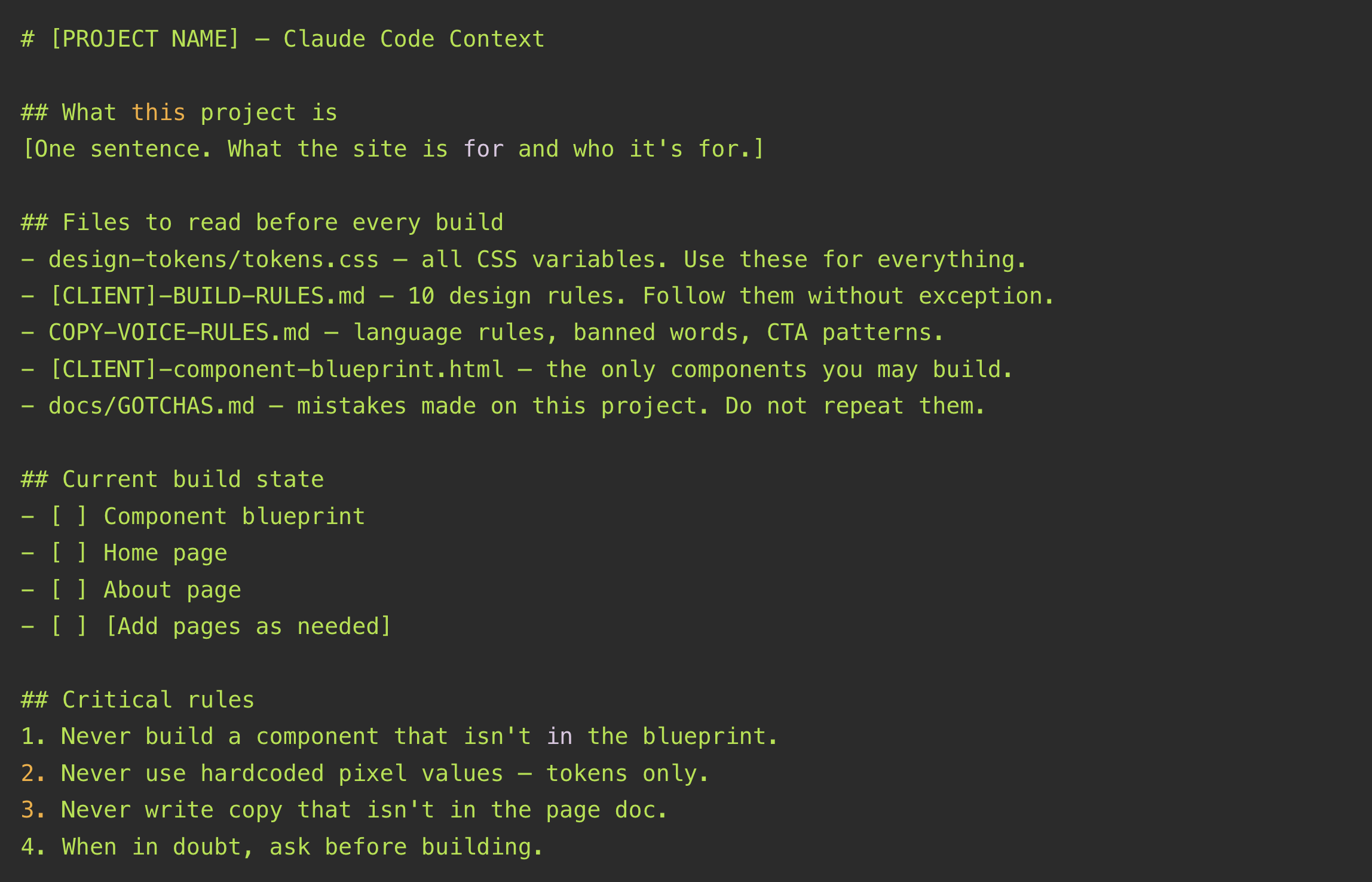
Keep this file up to date as pages are completed. That build state checklist is what tells Claude Code what it has already done and what's still open.
File 2: [CLIENT]-BUILD-RULES.md — The Non-Negotiables
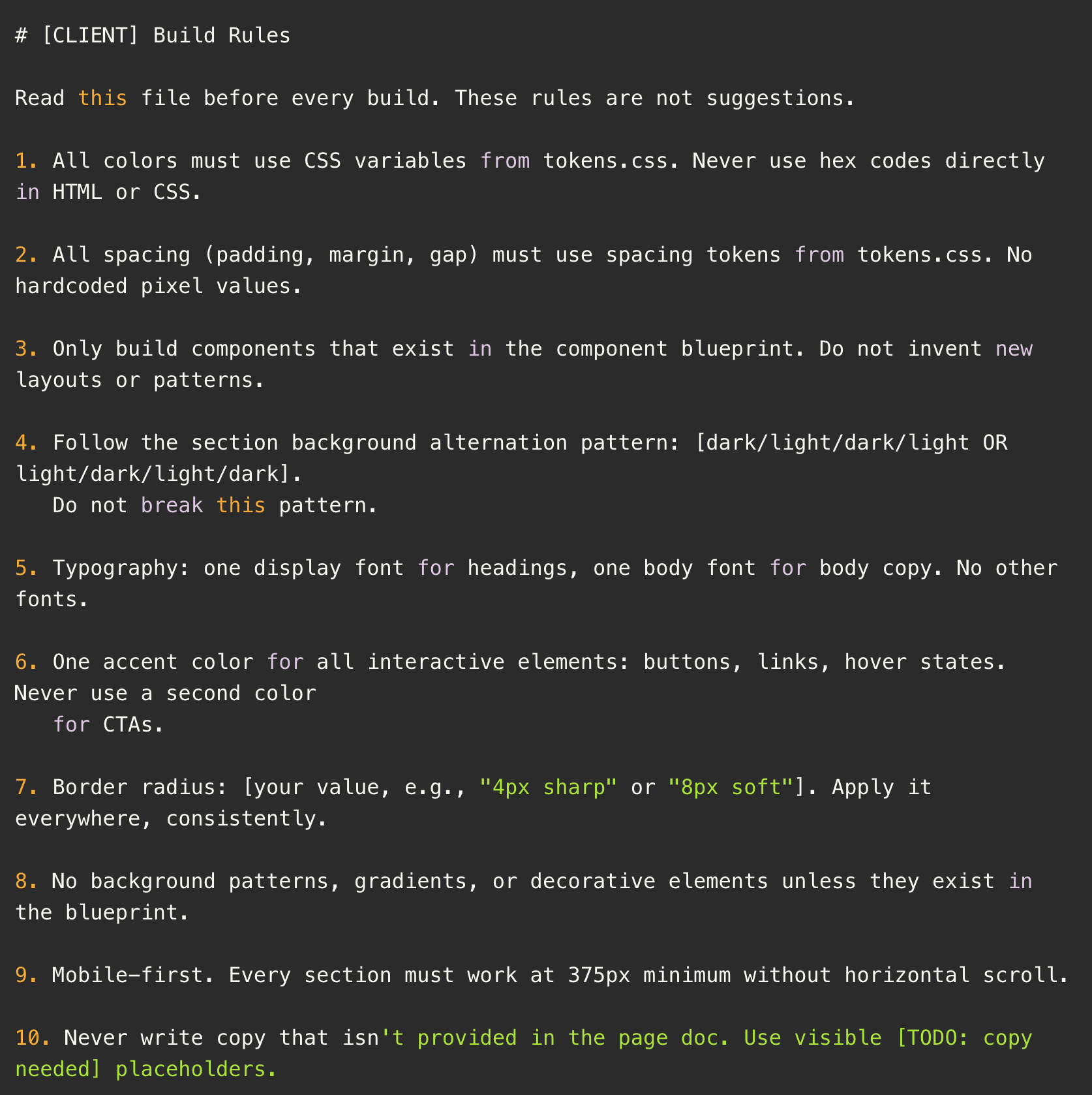
Ten numbered rules. Each one eliminates a category of design decision so Claude Code cannot improvise. The key is specificity. "Use good spacing" is not a rule. "All section padding uses var(--space-section) — no hardcoded pixel values, ever" is a rule. One correct behavior. Zero ambiguity.
After every build, review these rules. If Claude Code found a way around one, close the gap and document it.
File 3: COPY-VOICE-RULES.md — The Brand Voice Filter
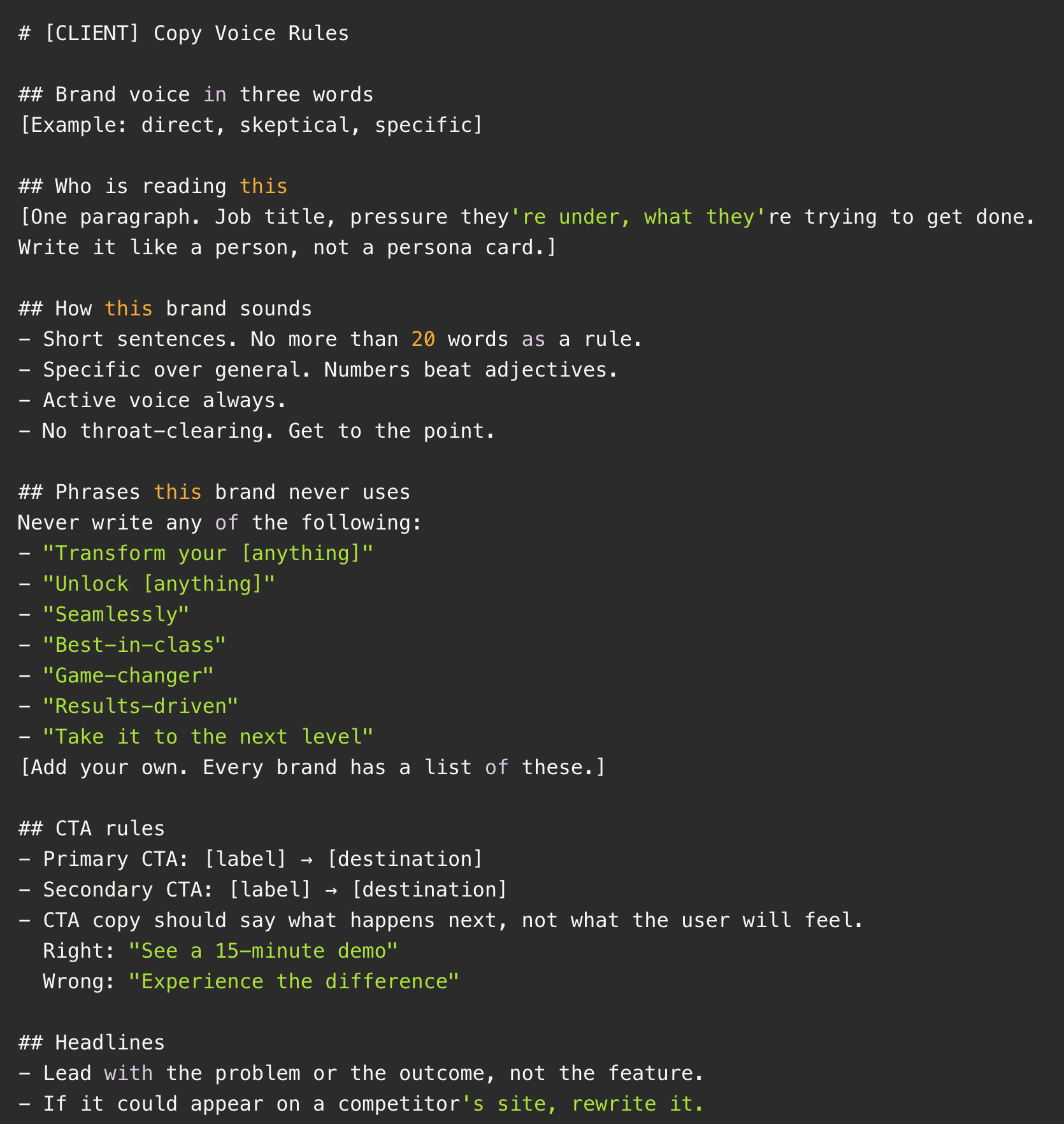
Without this file, every page sounds like it came from an AI marketing generator — transform, results-driven, unlock your potential. With it, every page sounds like the brand.
The most important section is the banned phrases list. "Don't sound corporate" is not actionable. "Never use: transform, elevate, unlock, seamlessly, results-driven, game-changer" is. Be specific. Every brand has a list. Build yours.
File 4: design-tokens/tokens.css — The Single Source of Truth
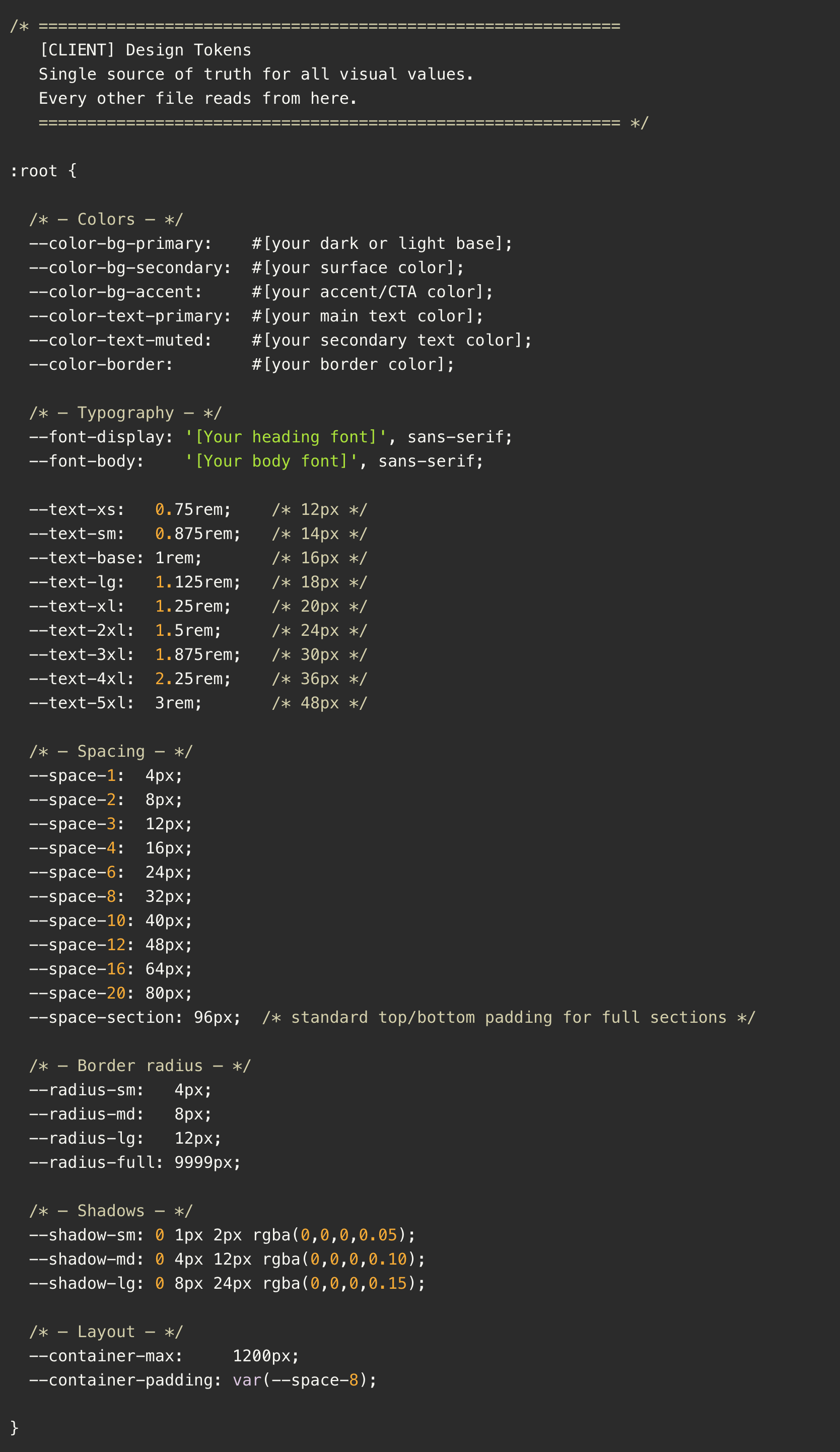
Every color, font, spacing value, border radius, and shadow lives here. One CSS file. Everything else points to it.
The rule is absolute: nothing in HTML or CSS uses a hardcoded value that belongs in tokens. If Claude Code outputs padding: 48px instead of padding: var(--space-section), that's a violation — and it goes directly into GOTCHAS.md.
When the brand decides to change a color, it's one line in this file. Every page updates. No hunting through components.
File 5: [CLIENT]-component-blueprint.html — The Approved Component Library
Every layout pattern Claude Code is allowed to use, rendered in a single HTML file. If a component isn't in here, it doesn't get built. Full stop.
You don't write this file manually — you generate it in Claude Code after tokens.css is in place, review it in a browser, correct anything wrong, then lock it. Once it's locked, it's law.
The prompt to generate it:
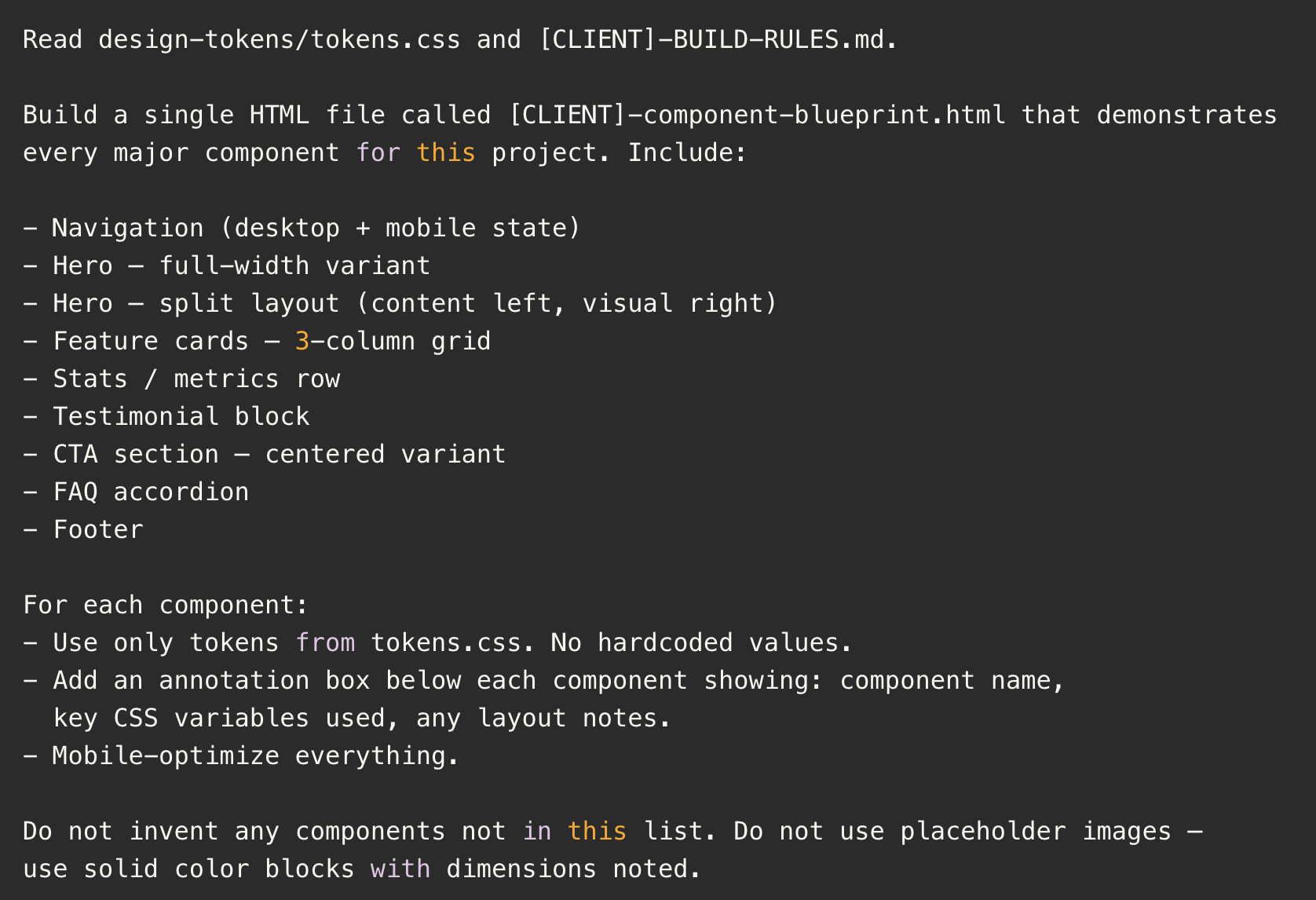
Review the output carefully before moving on. Every component you let slide here will compound across every page you build.
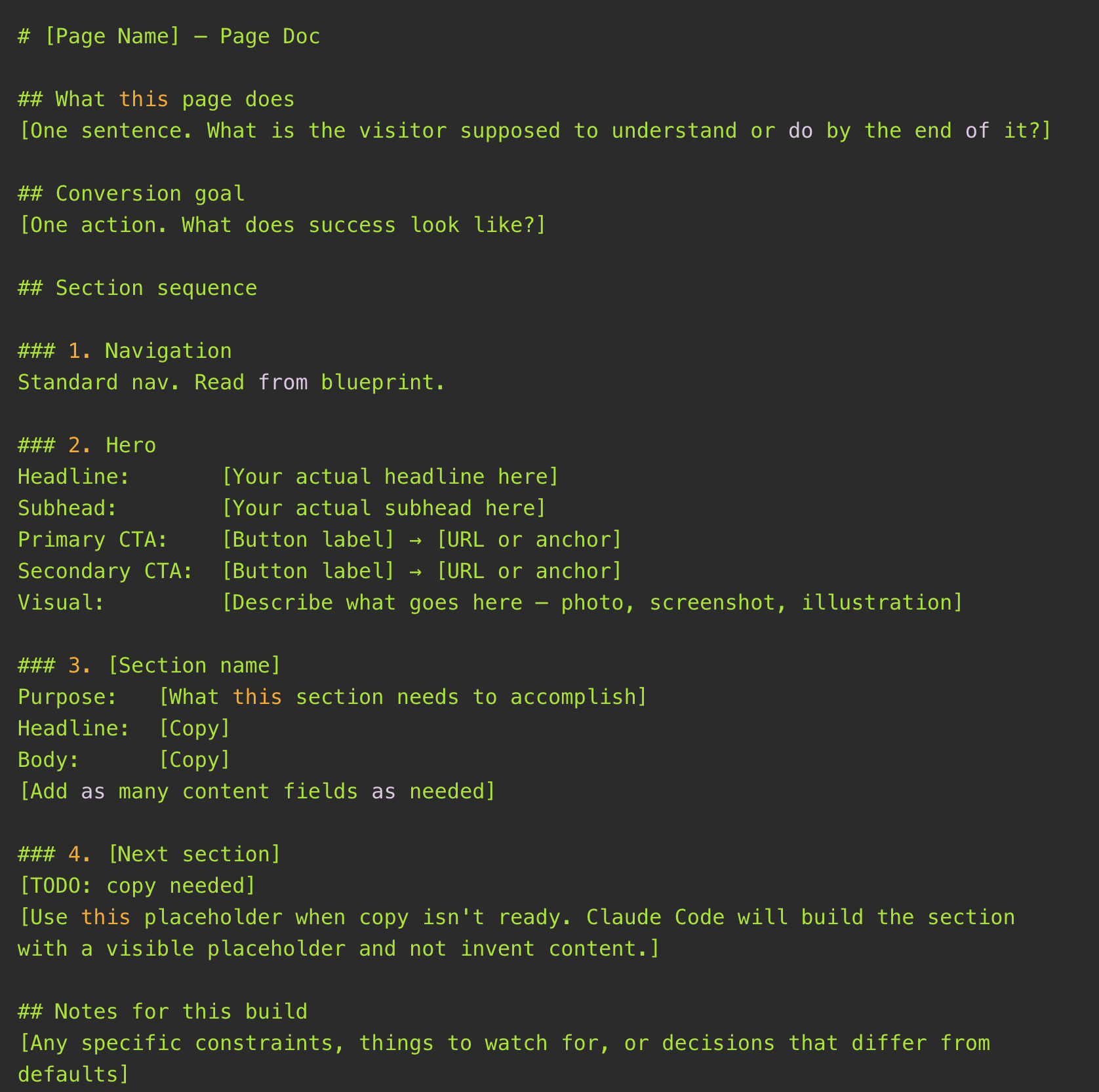
File 6: docs/pages/[page-name].md — The Page Brief
One file per page. Written by a human before every build session. This is the brief Claude Code executes from.
The most important rule: write the actual copy before building. Don't ask Claude Code to write copy. It will produce serviceable AI copy that sounds like every other AI copy. Write the headlines yourself. Write the CTAs yourself. Put them in the page doc. Claude Code places them on the page exactly as written.
The quality of this document determines the quality of the page.
File 7: docs/GOTCHAS.md — The Institutional Memory
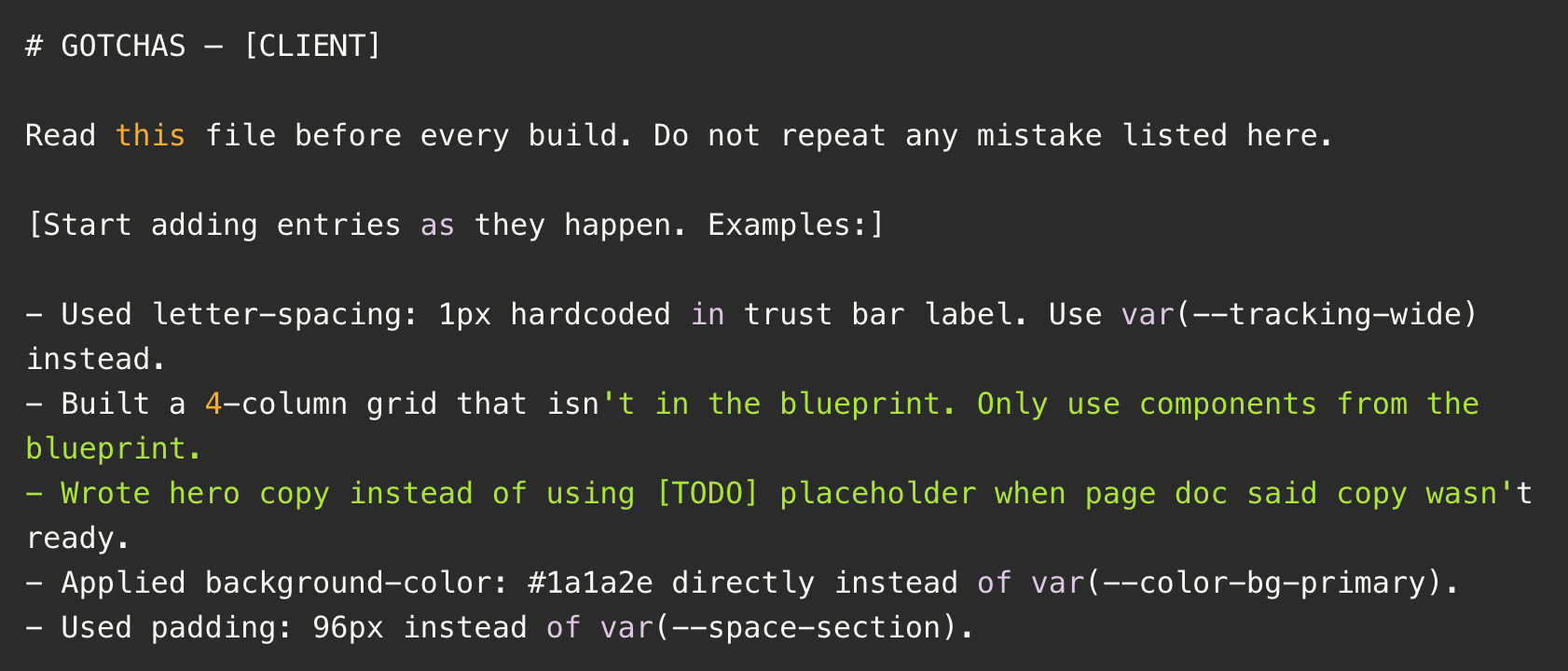
Start this file empty. It grows as you build.
Every time Claude Code makes a mistake you catch and correct, add one line. What it did wrong. What it should have done instead. After 15–20 builds, this file becomes one of the most valuable things in the project. Each entry is a mistake that will never happen again — on this client or any client.
The Build Loop
Once the Context Stack is in place, every page follows the same sequence:
- Write the page doc first. Section order, approved copy, conversion goal. This is the human work. It happens before the machine work.
- Open Claude Code and confirm it loaded context. Start every session with: "Read CLAUDE.md and confirm you understand the project. Tell me which pages are complete, which are in progress, what files you've loaded." If anything sounds off, paste CLAUDE.md directly and confirm before building.
- Run /build-page [page-name]. Claude Code reads all spec files and builds the HTML. Output goes to your project folder.
- Open the HTML in a browser. Check it against the component blueprint side by side. Look for anything that doesn't match.
- Run /review-page [page-name]. This QA pass catches what the eye doesn't — token violations, hardcoded values, components that don't exist in the blueprint.
- Run /commit. Creates a PR in GitHub. Review and merge.
- Log every mistake before closing. One line per mistake in GOTCHAS.md. Don't skip this step. The compounding value is real.
The Skill Files
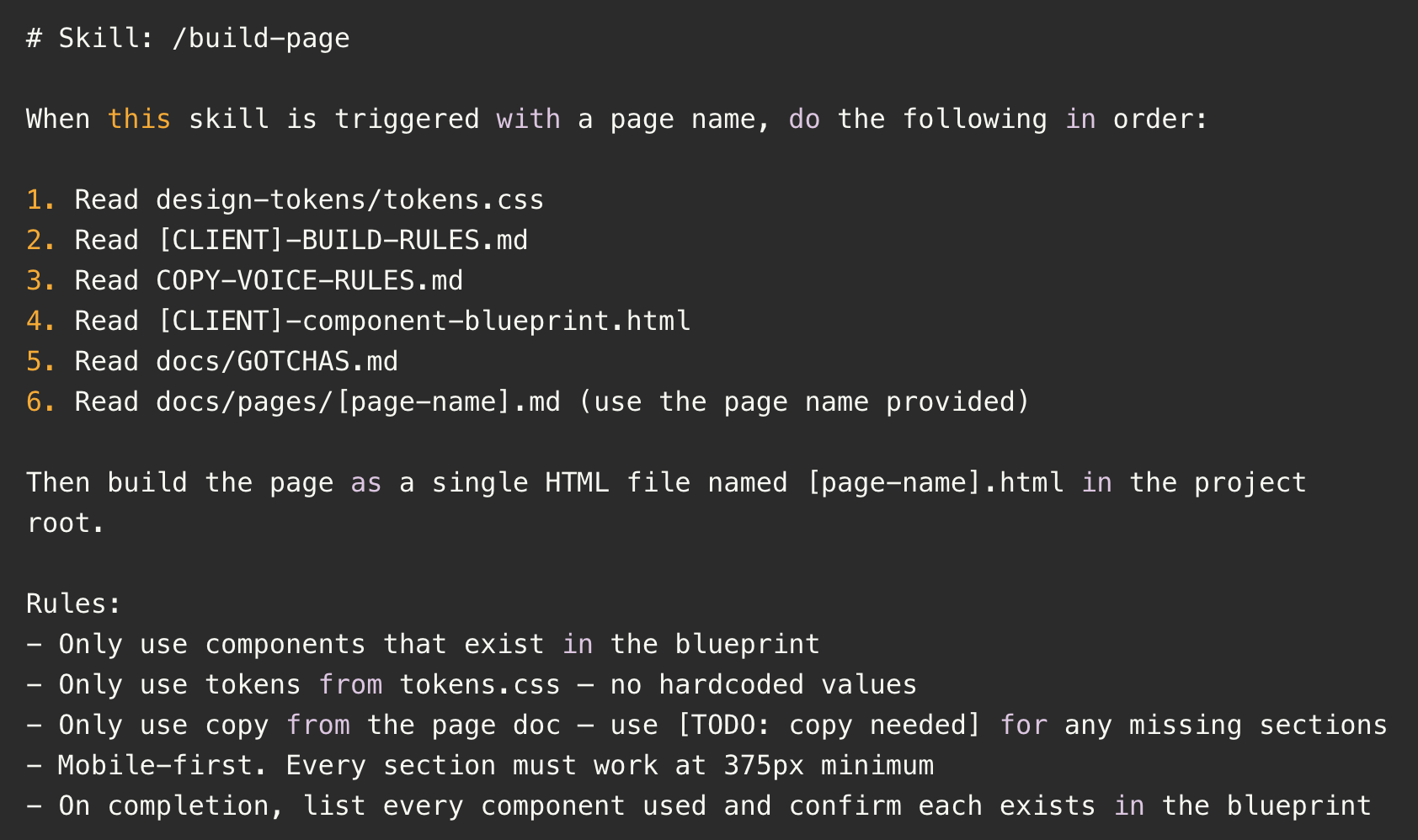
The /build-page, /review-page, and /commit commands are custom skills — markdown files stored in .claude/skills/[skill-name]/SKILL.md in your repo. Claude Code reads them when you type the slash command.
Here's the starter for /build-page:
What This Produces
The first time you run a full build with the Context Stack in place and get back a page that actually looks like the brand — consistent tokens, correct components, right voice — the investment makes sense immediately.
But the compounding effect is what matters. We've used this approach to build production-ready landing pages where the component blueprint built on day one drives every page variation with zero drift. When the brand needs five campaign landing page variants, they build in hours instead of days.
We're also applying the same approach to a Pardot export skill — one command outputs any page into Pardot-formatted table code, ready to drop into the ESP. Ten pages, thirty seconds.
The system isn't magic. It's structure. Claude Code is capable of high-quality output — it just needs the scaffolding to stay consistent. The Context Stack is that scaffolding.
Getting Started
You don't need all seven files before your first build. Here's the fastest path to a working system:
- Start with tokens.css. Make your brand decisions and lock them here. This is the foundation everything else references.
- Write the build rules. Ten rules. No vague ones. If a rule can be interpreted two ways, rewrite it.
- Generate the component blueprint. Use Claude Code to build it, review it carefully, then lock it.
- Set up CLAUDE.md. Keep it short. Point to the three files above.
- Write one page doc. Just one. Build the page. See what breaks.
- Start GOTCHAS.md. It begins with zero entries. That's fine.
The copy voice rules and page docs grow with the project. Everything else is set up once.
The files shared here are starters. The real ones for your project will be more specific, more opinionated, and more valuable — because they'll reflect design decisions you've actually made and mistakes you've actually caught.
That's the whole point. The system gets smarter every build. The output gets tighter. And the gap between "AI-generated website" and "production-ready brand asset" closes fast.
If you're building with Claude Code and want to see how Mighty & True uses this approach to build client programs — see how our systems work →